
How to Plan Family Meals From Your Fridge and Pantry
By Sunday afternoon you may know there’s soccer on Tuesday, but still have no idea what’s for dinner. Open the fridge before opening a recipe app. The half bag of spinach, the yogurt that needs using and the rice you already own are a better starting point than a blank weekly menu.
For moms and anyone who shares the cooking, two views make the job easier. The meal plan shows what the family will eat and when. The food inventory shows what you already have, how much is left and which dated items need attention. On supported FotoCube setups, browse a catalog of 10,000+ recipes and use the 20,000+ ingredient catalog to look up food when recording what you have. Those figures describe the catalogs. Your own inventory is the set of items you add and maintain.
Plan next week in one pass
- Start with food on hand. Search for the spinach, yogurt and rice in the ingredient catalog. Record the quantity and date for each item you want to track, whether it’s in the fridge or in the pantry. Check the on-screen expiry reminders and expired labels before picking meals. Update your entries as food is used or replaced.
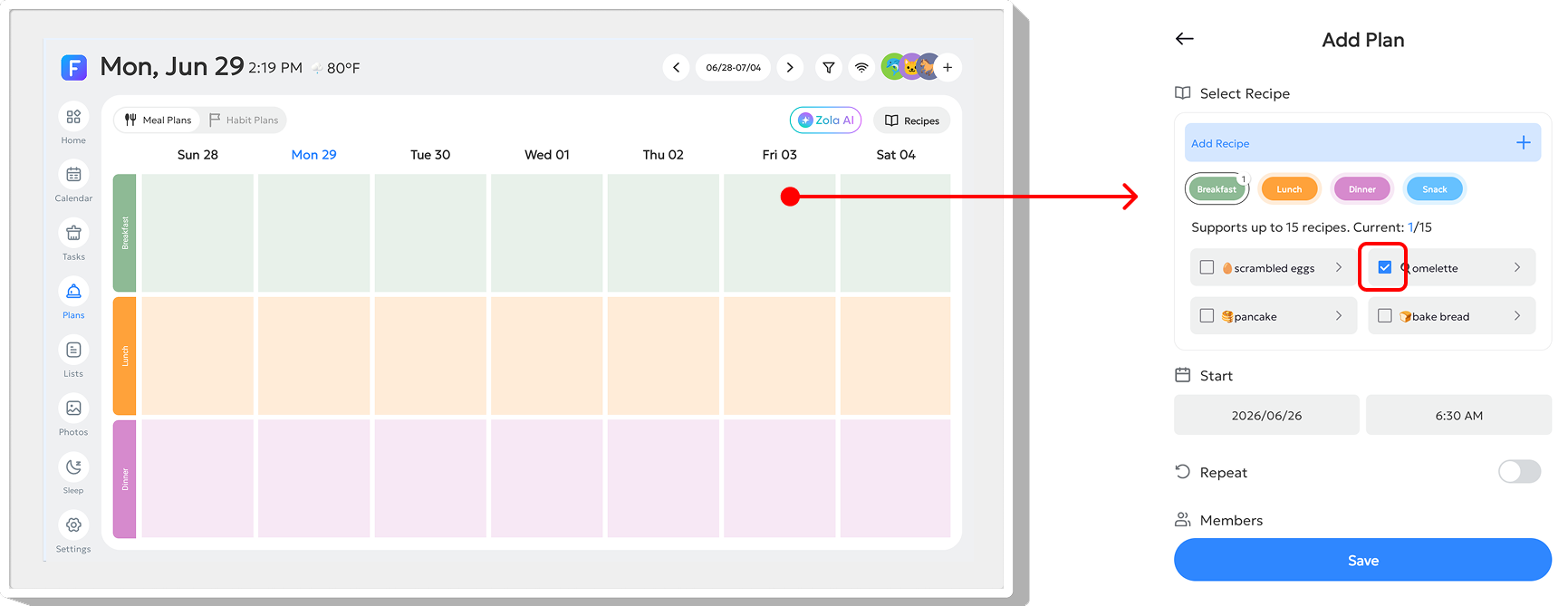
- Put the crowded days on the calendar first. On soccer night, use the leftover chicken for rice bowls and make a simple yogurt dressing. Schedule a slower recipe on a night when there’s time to cook. Search the recipe catalog for an idea or use a recipe you already saved.
- Fill breakfast, lunch and dinner where it helps. Plan yogurt and oats for Monday breakfast, spinach wraps for Monday lunch and a pasta dinner. On Tuesday, leave lunch open if the kids will eat at school. Add snacks only if someone needs to pack them. The display gives everyone a place to check the plan.
- Shop for what’s missing. Check the quantities you actually have, then add only the gaps to your shopping list. If the plan changes, update the meal slot and revise the inventory after cooking so the next person sees what’s left.
Want suggestions for the spinach and rice? The optional Zola AI fridge-photo tool can suggest recipes from a photo on supported setups. Use it to get ideas, then confirm the ingredients you actually have. The saved quantities and expiry dates are maintained in the inventory. The expiry indicators reflect the dates recorded there. Follow the package and storage instructions for the food itself.
Compare meal planning, grocery lists and pantry tools
Scroll the table sideways on a small screen.
| What you need | FotoCube Calendar / Pro | Skylight Calendar | Cozyla Calendar Neo |
|---|---|---|---|
| Plan a week of meals | Place recipes in breakfast, lunch, dinner or snack slots. Manual meal planning is included on supported displays. | Basic includes custom lists. Calendar Plus adds the full meal planner and Recipe Box. | The Meals app documents recipe creation and import, meal plans and grocery lists under Calendar Essential. |
| Track food you already own | Search 20,000+ catalog ingredients, enter quantities and dates, and review on-screen expiry indicators on supported software. | The advertised Fridge Photo tool in Plus suggests recipes from a photo. The cited plan materials describe grocery lists and recipe suggestions. | Pantry supports searchable ingredients, quantities and expiry dates under Calendar Essential. |
| Figure out what to cook | Browse 10,000+ recipes, use your saved recipes or try the optional Zola AI meal tools. Check plan limits for AI tools. | Save recipes in Recipe Box or ask Sidekick for meal and recipe ideas with Calendar Plus. | Create or import recipes and reuse meals by copying a plan to another date. |
Which setup fits your kitchen?
Choose FotoCube if your Sunday planning starts with “What’s left?” and you want a searchable recipe collection, ingredient tracking and a shared weekly menu. Skylight Plus is a reasonable choice when the priority is collecting favorite recipes and using Sidekick for suggestions. Cozyla Calendar Neo also supports dated pantry items and meal planning through Calendar Essential. If you’re considering its Calendar Plus series, Cozyla lists those tools as included with the device. Compare the exact models you’re shopping for.
Sources and next steps
Compared on November 25, 2026. Catalog sizes are reported by FotoCube. Feature availability can vary by device, app version and plan.
- FotoCube manual meal planning and weekly AI meal planning and fridge scan.
- Skylight Calendar Plus features and basic lists and Fridge Photo.
- Cozyla membership by model and Calendar Neo’s Meals and Pantry guides.
Put one week of meals on the calendar
Use the illustrated steps to create a meal plan, add a recipe and edit a meal.
Open the meal planning guide